
By Susan Wroble (Note that a version of this post first appeared in RMC Kite Tales, Spring 2023)
Have you ever noticed the disclaimers on some book reviews posted to book blogs or Goodreads? “I received this book from the publisher via Edelweiss so I could provide an honest review. No compensation was given and all opinions are my own.” They aren’t talking about that “Sound of Music” flower!
Edelweiss (aka Edel) is an online platform where publishers make advance reader copies (ARCs) available in digital formats to select readers before the books are published. They do this to encourage early reviews and generate buzz before a book comes out.
In the Rocky Mountain Chapter of SCBWI’s Publishing Path webinar series, developmental editor Susan Chang recommended that everyone should have an Edel account, but for surprising reasons unrelated to reviewing e-ARCs (electronic ARCs). And when someone like Susan says “everyone should,” I pay attention.
Susan explained that for authors, having an Edel account is an efficient way to read new books in your category, find comparable titles (comps) for your own work, explore marketing plans, and study a publisher’s catalog before submitting to them.
Regardless of where you are in your publishing journey, you will eventually want to have access to upcoming releases as you study the market for your work-in-progress. And we all know that finding good comp titles can be tricky, so I am very excited about this platform. Edelweiss can make parts of querying so much easier, and setting up an account is FREE!
CREATING YOUR PROFILE AND REQUESTING ADVANCE READER COPIES:
Start on Edelweiss by navigating to www.edelweiss.plus to create your profile. To get approved to read those digital reader copies (DRCs, Edel’s version of the e-ARC), your profile strength needs to show as “excellent.” Profile strength (with levels like incomplete, good and excellent) is based on how much of the profile you have completed. The question mark beside your strength will show you what is missing. Keep tweaking until you get to excellent.
When you request DRCs, you are most likely to get approved if you show that you write reviews. Here’s a version of my profile, which shows who I review and why:
I’m a children’s author and voracious reader. I usually max out my library card, and my house is full of books that I am either reading or using as mentor texts for my stories. I currently serve as Co-Regional Advisor of the Rocky Mountain Chapter of the Society of Children’s Writers and Illustrators (SCBWI), and am a member of the marketing group STEAMTeam 2023. The two groups that I usually support through reviews (Amazon, Goodreads, Instagram, and the Instagram of the nonprofit organization Partners in Literacy) are children’s nonfiction authors and children’s authors in the Colorado/Wyoming area.
Note that when you request a specific DRC, you will also need to write a few sentences about why you’ve requested that book. Once you’re granted access, you’ll be provided with a link to download the manuscript in a variety of ways. You can even connect your e-reader and receive the e-ARCs on your personal devices. Remember, though, you’re being provided the sneak peek with the expectation that you’ll write and post a review after reading, so if you love the book, try to be a good author citizen, and follow through. Goodreads, Amazon, and Barnes & Noble are all great places to leave reviews. Your fellow authors will thank you!
USING EDEL TO FIND COMPS:
While the ability to search for comparable titles, or comps, is one of the huge benefits of Edelweiss, there is one caveat. In query letters, comps are designed to give the agents or editors a feel for the subject or tone or theme of your story. In Edelweiss, comps are intended for marketing. Keeping that nuance in mind, they are incredibly valuable.
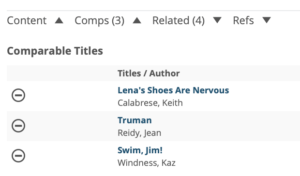 Here’s how to find them: under the “Search for titles” box, type in a title. Using Kaz Windness’s BITSY BAT as an example, note that at the bottom are a series of carrots next to “Content, Comps, Related, Refs.” Clicking on comps and refs gives us three books that are considered comp titles, and others that are related in some way (in this case, because Kaz wrote it!).
If you have a book that might make a good comp, a great next step is to check Edelweiss. You’ll get what the professionals consider to be the comps for that book.
USING EDEL TO REVIEW MARKETING PLANS:
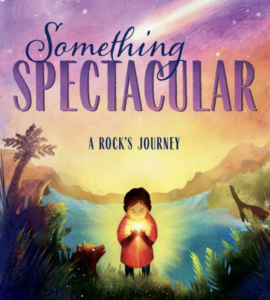
Authors are increasingly being asked to submit marketing plans. Again, Edelweiss can be a huge help. The marketing plans posted here are often a mix of author and publisher activities, but be aware that not all books will have them. To find the marketing plan, go back to those “Content, Comps, Related, Refs” carrots. Clicking the carrot by “Content” for Carmela Coyle’s SOMETHING SPECTACULAR: A ROCK’S JOURNEY gives the summary, bio, marketing plan and selling points. In the marketing plans, you can see the specific blogs that will be targeted for this picture book.
Marking Plan (SOMETHING SPECTACULAR):
As for me, Edelweiss has provided such great data that I am now revamping the comp titles and marketing plans for my works-in-progress. The time spent learning how to navigate this site truly pays off.
(Tech note for Apple users: Chrome seems to be a better browser than Safari for Edelweiss. Once in, Apple’s “Command F” search function is far more powerful than the internal search.)
This sounds intriguing! I’m curious to see how you put Edelweiss to work. Are you referring to the Edelweiss+ platform for book discovery and marketing? If so, any tips or insights on maximizing its potential would be greatly appreciated. Looking forward to learning more!